
Interested in this product?
Request informationTalk-Show, multiconference and external coordination system for radio, TV and corporate environments
SYSTEL MAX is a broadcast telephony, multiconference and coordination system that drastically reduces communication costs, significantly improves quality, and increases flexibility and integration with each station's own telephone system. It represents a very low investment with a fast return.


Based on a 4-wire digital matrix. Allows simultaneous interventions
Major savings by connecting to internet telephony providers
Flexibly and dynamically shares IP lines with up to 8 studios
IP audio inputs and outputs (Dante, AES67 compatible)
Different control terminals: touch-screen phone, PC app
Huge installations with dozens of studios and IP exchanges
Functional Description

SOLARIS, the Systel MAX engine, has only an information display on the front panel and a button to access additional screens with detailed information.

As communication is entirely IP-based, the rear panel only has 5 network ports, a USB port for maintenance, a CUE output, and the connectors and switches for redundant power.


The widest functionality for managing conversations and communications over VoIP
PDFCatalogEngine
The system is based on "SOLARIS for SYSTEL MAX", a 19" rack unit with 5 IP ports for implementing redundant AoIP, VoIP and control networks.
It can activate (depending on the licence) up to 128 IP telephone lines or operator extensions, and 128 IP inputs/outputs with AES67 or Dante protocol — sufficient for a multi-studio radio or television centre supporting up to 8 studios.
The unit works as a set of multi-line IP phones with SIP signalling. It is compatible with IP PBX, SIP Trunking and virtual PBX systems. It also supports analogue and ISDN telephone lines via gateways.
Control applications
Systel IP Original
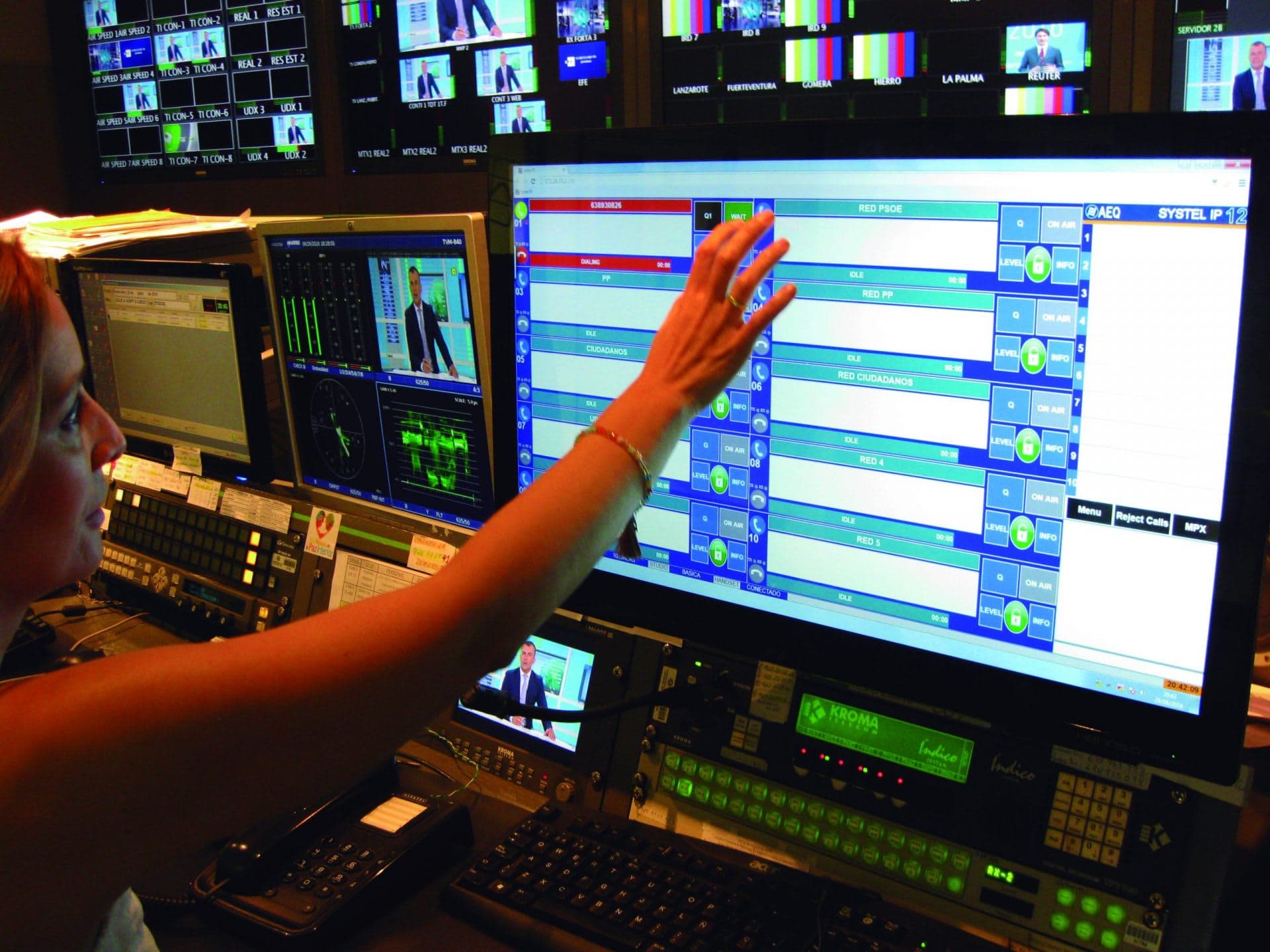
Consists of a PC control application and a conventional IP phone. Based on call queues, generally for radio use.
It is the best option in high-productivity environments with functionality distributed across roles such as producers, operators and presenters.
Systel IP TV
With a similar appearance to the Original, it is based on multiplex to provide access to intercom systems or external technical intercommunication — more common in television.
Systel SET MAX
This is the operating application integrated into the SYSTEL SET MAX touch-screen phone, enabling very flexible operation and eliminating the need for a PC in control rooms or other small spaces.
Technical Details
General Features
- SIP communications protocol: Compatible with VoIP trunking, open-source Asterisk and major-brand proprietary PBX, SIP phones such as Phoenix Pocket and Phoenix Lite, N/ACIP-compliant audiocodecs such as Phoenix Mercury, Phoenix Studio, Phoenix Venus, Phoenix ALIO, and FXO gateways of types PSTN, ISDN, E1 and T1.
- Based on a non-blocking digital matrix, up to 16 lines out of a maximum of 128 can participate simultaneously in a live programme without quality loss.
- The unit routes its audio inputs and outputs via AoIP in AES67 and Dante formats. Audio characteristics depend on the AoIP equipment connected to the network, for example AEQ Forum or Capitol consoles, or AEQ Netbox interfaces.
- Telephone audio in G.711, 50 Hz – 3 kHz.
- HD audio with G.722 algorithm, 50 Hz – 7 kHz.
- Automatic gain control.
- Independent digital gain control on all inputs and outputs.
Configuration software and control server (Windows 10/11)
- Uniquely assigns audio circuits, handsets, IP phones and chats to different studios.
- Renames circuits.
- Defines and manages directories, allowing users to share, edit and copy them.
- Defines the PFL signals assigned to each studio.
- Defines the auxiliary and master signals assigned to each studio.
- Configures the initial audio levels for each line and each studio.
- Configures the format of client screens, defining the number of lines per programme, console operation, or operation with one or more call queues.
- SIP configuration for communication with IP-PBX exchange, FXO gateway, external IP telephony provider (via Internet) or internal (on a LAN or WAN).
- Distinguishes and protects with activity rights the functionalities of different types of users.
SYSTEL IP Original and SYSTEL IP TV control clients (Windows 10/11)
- Make calls: by dialling numbers, SIP identifiers or directory and scheduling records.
- Make calls: by dialling numbers on IP phones with IP handset functionality. Emit a visual and audible RING signal.
- Display caller ID or number. Identify callers by name in the directory. Add a temporary name.
- Answer incoming calls manually and automatically.
- Define and manage telephone directories, general and private by programme.
- Register new contacts in the directory.
- Create and manage telephone call schedules.
- Talk via headset microphone or headset with the person on the other end of the line.
- Put calls on hold while listening to the programme.
- Put calls on air so they can contribute to the programme.
- Queue calls ready to go on air on one or more faders, allowing dynamic reordering and monitoring.
- Assign a call the VIP attribute to keep it on an exclusive fader.
- Change headphone listening levels and input/return levels for each telephone line in the studio.
- View the status of each telephone line, how long it has been in that status and where it is being routed.
- Label calls.
- Chat between the different controllers assigned to a programme (Original version only).
- Blacklist management.
- Incoming call blocking.
SYSTEL SET MAX control client (Android)
- Make calls: by dialling numbers, SIP identifiers or directory and scheduling records.
- Make calls: by dialling numbers on the phone.
- Emit a visual and audible RING signal.
- Display caller ID or number. Identify callers by name in the directory.
- Temporary name assigned from the SYSTEL IP Original application.
- Answer incoming calls manually and automatically.
- Register new contacts in the directory.
- Manage telephone directories, general and private by programme.
- Manage telephone call schedules.
- Talk via headset microphone, speakerphone or headset with the person on the other end of the line.
- Put calls on hold while listening to the programme.
- Put calls on air so they can contribute to the programme.
- Queue calls ready to go on air on one or more faders, allowing dynamic reordering and monitoring.
- Assign a call the VIP attribute to keep it on an exclusive fader.
- Change phone listening levels and input/return levels for each telephone line in the studio.
- View the status of each telephone line, how long it has been in that status and where it is being routed.
- Distinguish and protect with activity rights the functionalities of producer, operator and presenter.
- Blacklist management. Incoming call blocking.
- Work with the typical terminology and functions of American and European working modes.
- Activate Dump Mode to hang up or not hang up calls after they have been on air.
- Activate Page Lines to send notifications to all lines and receive simultaneous replies.
- Activate Auto Next to move to the next call when another is hung up.
- Activate PickUp Incoming to automatically connect to the oldest call when lifting the handset.
- Activate AutoQueue to automatically queue the call when hanging up the handset.
- Activate Direct Dial to skip the step of selecting a line before calling.
- Activate Direct Next to put calls on air even without answering them first.
SOLARIS. Engine for SYSTEL IP MAX
- Diagnostics via SNMP and Syslog.
- Universal redundant power supply: 100–240 V, 50/60 Hz, 50 VA.
- No mechanical fan. Silent. Natural convection cooling.
- Operating temperature: 0 to 45 °C.
- Approximate weight: 5 kg (11 lbs).
- Width: 482 mm (19″), height: 1 rack unit, 44.5 mm (1.75″), depth: 300 mm (12″).
SYSTEL SET MAX IP phone with built-in control application
- 7″ multi-touch screen.
- 8 fully programmable function keys.
- Programmed with the SYSTELSET MAX application on Android 5.1.1.
- 12-key telephone keypad.
- Dual Gigabit Ethernet port: 10/100/1000 Mbps.
- Headset connector. 1 × RJ9 (4P4C).
- Handset connector. 1 × RJ9 (4P4C).
- USB 2.0 port for wireless or wired USB headsets.
- HD Voice.
- Speakerphone.
- External power supply 100–240 VAC 5 V DC and PoE (IEEE 802.3af), class 3 max 6 W.
- Dimensions (W × D × H × T): 259.4 mm × 235.2 mm × 194.5 mm × 42.6 mm.
- Weight: 916 g.
Downloads
Catalogs and technical documentation available for SYSTEL MAX.